AI Form Builder ChatGPT Setup
2 minutes read
The Forms.md WordPress plugin comes with an AI form builder that lets you create/edit forms easily just with prompting from WP admin. However, if you want to use your ChatGPT (instead of our servers), then this guide will show you how in 2 minutes. Generally, setting up your ChatGPT should result in better form output, and it's completely free!
1. Download Project Files
Download the ZIP and extract the guide.md file.
2. Create a ChatGPT project
From ChatGPT's sidebar, create a new project: Projects → New Project → Add a name and save.
3. Set Up the ChatGPT Project
- Go to the Sources tab in the project page you just created.
- Click on the Add button.
- Attach/upload the
guide.mdfile. - Optionally, turn memories off. This generally improves output.
4. Start Generating Forms
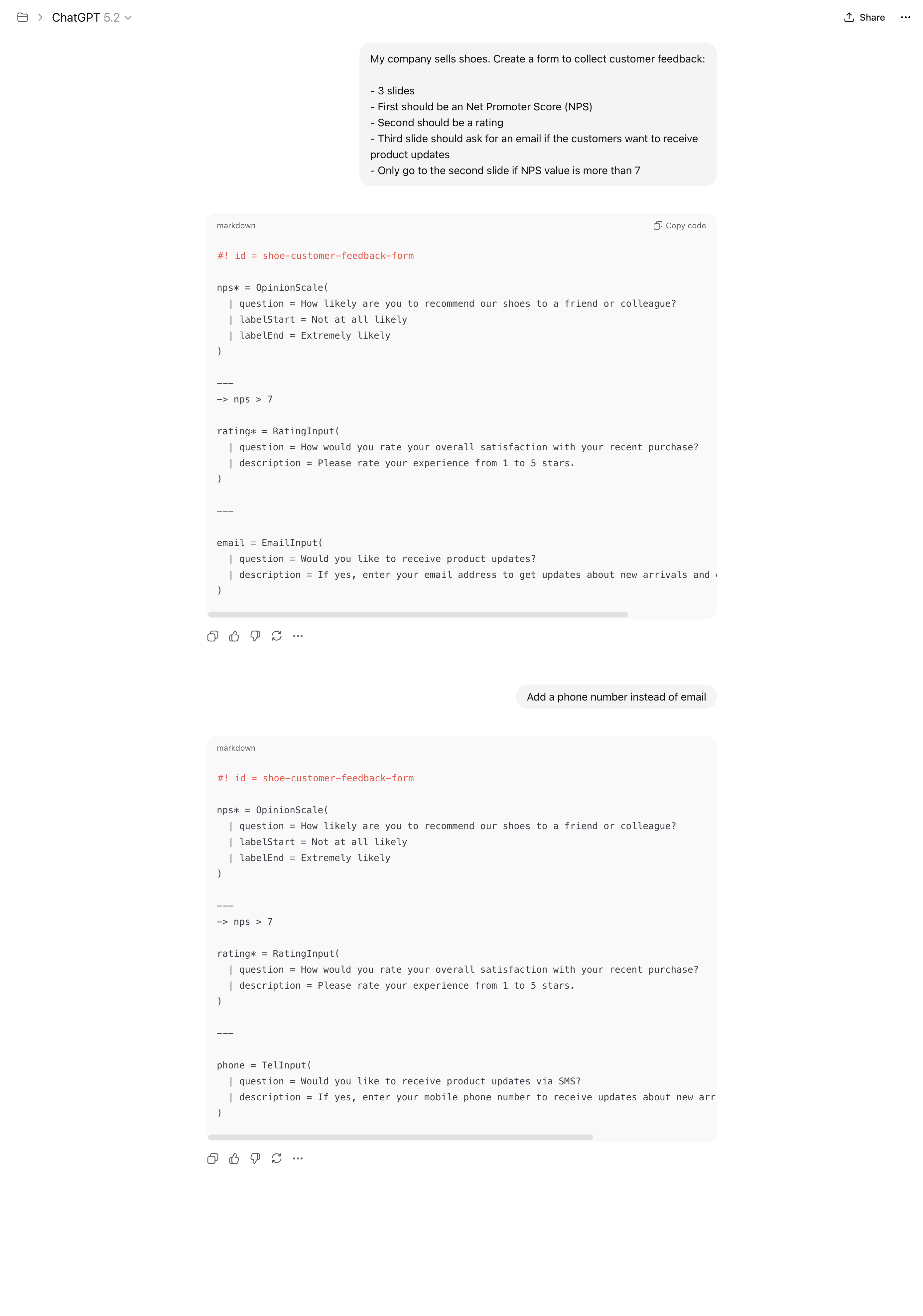
And you're all set up. You can start chats within this project, and ChatGPT will create/edit forms for you. Take the Markdown-like text output that ChatGPT produces and paste it in your form's WordPress admin content field. Below is an example of how ChatGPT generates form content that you can directly use in WordPress.